
SQL directives keep your result layout with your Oracle Fusion query
Short answer: Data Collage SQL directives are leading comments such as --@title, --@hide, and --@format. They control how the app presents a query result without changing the data requested from Oracle Fusion.
If a query is reviewed and shared as a SQL file, its layout should be easy to share too. Directives keep the tab name, column choices, order, and formats in the same text file. A colleague can open the SQL and get the intended starting presentation.
Which SQL directives does Data Collage support?
| Directive | Purpose |
|---|---|
--@title | Name the editor tab. |
--@hide | Hide selected columns. |
--@show | Show only selected columns. |
--@column_order | Arrange columns in a specified order. |
--@format | Apply number, currency, or date display formats. |
The syntax is --@name: value or --@name = value. Directive names are case-insensitive, and extra spaces are accepted.
Where do the directives go?
Put them in the leading comment block, above the first line of SQL. Blank lines and ordinary line comments can appear in the same block. Reading stops at the first real SQL line, so directives placed below it are ignored.
If the same directive appears twice, the first one wins. In a file containing multiple statements, each statement’s directives apply to that statement.
Refer to columns by their result heading, including any alias in the SELECT list. Directive column matching is case-insensitive. A name that does not match is skipped; if none of the names in --@show match, the directive is skipped rather than hiding everything.
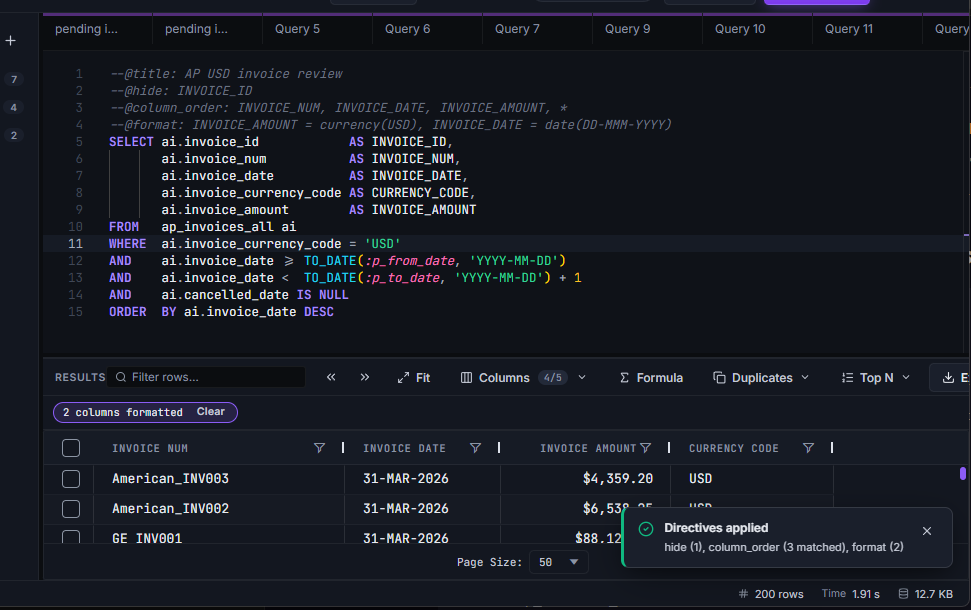
Example: an AP invoice review with a consistent layout
--@title: AP USD invoice review
--@hide: INVOICE_ID
--@column_order: INVOICE_NUM, INVOICE_DATE, INVOICE_AMOUNT, *
--@format: INVOICE_AMOUNT = currency(USD), INVOICE_DATE = date(DD-MMM-YYYY)
SELECT ai.invoice_id            AS INVOICE_ID,
       ai.invoice_num           AS INVOICE_NUM,
       ai.invoice_date          AS INVOICE_DATE,
       ai.invoice_currency_code AS CURRENCY_CODE,
       ai.invoice_amount        AS INVOICE_AMOUNT
FROM   ap_invoices_all ai
WHERE  ai.invoice_currency_code = 'USD'
AND    ai.invoice_date >= TO_DATE(:p_from_date, 'YYYY-MM-DD')
AND    ai.invoice_date <  TO_DATE(:p_to_date, 'YYYY-MM-DD') + 1
AND    ai.cancelled_date IS NULL
ORDER  BY ai.invoice_date DESC
The tab gets a meaningful name. The internal invoice ID stays in the result but starts hidden. The key business columns appear first, with a readable date and a US-dollar amount format.
The SQL explicitly filters to USD. A currency directive labels the display; it does not convert an amount or infer a currency from another column.
For an essentials-only view, replace the hide line with:
--@show: INVOICE_NUM, INVOICE_DATE, INVOICE_AMOUNTOrder wide results without listing every column
Use * in a column-order directive to stand for the remaining columns:
--@column_order: VENDOR_NAME, INVOICE_NUM, *, AUDIT_FLAGThe named columns before the wildcard move to the front. Those after it move to the end. Everything else retains its original relative order in the middle.
Make number and date formats explicit
Use number formats such as number(2dp), percent, or scientific. Percent formatting displays a value such as 0.1234 as 12.34%; it does not change the stored value.
Currency formats take a code, such as currency(EUR) or currency(JPY), with decimal places following the currency convention. Date formats include date(YYYY-MM-DD) and date(DD-MMM-YYYY).
Unknown formats or unmatched column names are skipped, and a message after the run reports what applied. Export behavior still depends on the export’s Apply column formats setting.
How do directives work with manual changes and saved analyses?
Directives reapply when you run the query, including when you reuse recent results. A manual grid change made afterwards stays in effect until the next run. The title directive acts while you type, without waiting for execution.
Use directives when you want presentation in a plain-text SQL file that can be versioned and reviewed. Use a saved analysis when you also want formula columns and bind defaults. The two approaches can work together.
Frequently asked questions
Do SQL directives change the query Fusion executes?
No. Data Collage interprets them locally as presentation instructions. They are handled as comments, not executable Oracle SQL.
Does hiding a column remove its data from the query result?
No. It hides the display column. To avoid retrieving a field, remove it from the SELECT list.
Can directives be shared in an ordinary SQL file?
Yes. They are plain text, so they travel with the query through file sharing and version control.
Do currency directives perform exchange-rate conversion?
No. They control display formats. Currency conversion requires an appropriate calculation in your data or SQL.
Related features
- Results grid — explore the presentation options directives control.
- Saved analyses — save formulas and bind defaults alongside your query.
- SQL editor — write and format the SQL underneath.
Want your Fusion queries to carry their presentation with them? Get in touch with Newarc Consulting to discuss your requirements and how to get started.